Dependency Injection
The @archibald/server package comes with dependency injection functionality that can be used to manage services.
import { Service, Inject, Container } from '@archibald/server';
| Name | Description |
|---|---|
| Service | Register a new service. |
| Inject | Use a service. |
| Container | Manage service instances. |
Let's create what is shown in the example below by using the dependency injection functionality.

Register a new service
In order to create a new service the BaseService class has to be used as described here. Next use the Service decorator function to make a service injectable.
import { Service } from '@archibald/server';
TestServiceA
Create a new service TestServiceA in the shop/src/shop/server/api/services/test folder.
import { BaseService, Service } from '@archibald/server';

@Service()
export class TestServiceA extends BaseService {
	constructor() {
		super('TestServiceA');
	}

	testMethod() {
		return 'Service A';
	}
}
TestServiceB
Create a new service TestServiceB in the shop/src/shop/server/api/services/test folder.
import { BaseService, Service } from '@archibald/server';

@Service()
export class TestServiceB extends BaseService {
	constructor() {
		super('TestServiceB');
	}

	testMethod() {
		return 'Service B';
	}
}
Make a service globally available
After registering a service it has to be exported in shop/src/shop/server/api/services/index.ts file.
export { TestServiceB } from 'shop/server/api/services/test/TestServiceB';
export { TestServiceA } from 'shop/server/api/services/test/TestServiceA';
:::
The exported services are then registered in shop/src/shop/server/module/server.tsx using the registerServices method. For more info see the description of CoreServer class.
The order in which services are register is important. In the example, TestServiceA service is using TestServiceB service therefore TestServiceB service has to be registered before TestServiceA service.
Use a service
In order to use a service, it has to be injected by using the Inject decorator function.
import { Inject } from '@archibald/server';
TestServiceA
Inject TestServiceB service into TestServiceA service.
import { BaseService, Inject, Service } from '@archibald/server';

@Service()
export class TestServiceA extends BaseService {
	@Inject()
	private testServiceA: TestServiceA;

	constructor() {
		super('TestServiceA');
	}

	testMethod() {
		return `Service A uses ${this.testServiceA.testMethod()}`;
	}
}
Override a service with another service
To override a service with another service the provide method of Container can be used.
import { Container } from '@archibald/server';

Container.provide({
    provide: TARGET_SERVICE,
    value: REPLACEMENT_SERVICE
});
Let's create an override for TestServiceB.
TestServiceBOverride
Create a new service TestServiceBOverride in the shop/src/shop/server/api/services/test folder.
import { Service } from '@archibald/server';
import { TestServiceB } from 'shop/server/api/services';

@Service()
export class TestServiceBOverride extends TestServiceB {
	testMethod() {
		return 'TestServiceBOverride';
	}
}
Change the type of testServiceB field in the TestServiceA service.
// Imports

@Service()
export class TestServiceA extends BaseService {
	@Inject()
	private testServiceB: TestServiceBOverride;

	// Other stuff
}
In shop/src/shop/server/index.tsx add the following at the beginning of bootstrap function.
Container.provide({
    provide: TestServiceB,
    value: TestServiceBOverride
});
Verify the configuration
Create a new route in templates/shop/src/shop/server/routes/system.ts.
{
    method: RouteMethod.GET,
    path: '/backend/test-dependency-injection',
    handler: 'BackendController.testDependencyInjection'
}
Add the testDependencyInjection handler method in the BackendController controller.
// Other imports
import { TestServiceA } from 'shop/server/api/services';

export class BackendController extends BaseController {
    @Inject()
    private readonly testServiceA: TestServiceA;

    // Other stuff

    async testDependencyInjection(request: Request, h: ResponseToolkit) {
        this.logControllerEntry(request, 'testDependencyInjection', this.name);
        const response = this.testServiceA.testMethod();
        return h.response(response);
    }
}
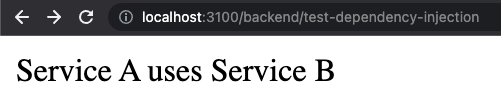
Access the /backend/test-dependency-injection endpoint in the browser. You should see the following:
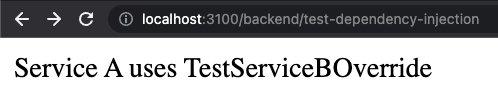
Assuming you added an override for TestServiceB, you should get the following output:
Testing
There is a handy method exported from @archibald/auth called registerTestBed.
// Other imports
import { ConfigService } from '@archibald/server';

import { ProjectConfigService } from 'shop/src/shop/server/api/services';

describe('services/example-test', () => {

    beforeEach(() => {
        registerTestBed({
          services: [
              {
                  provide: ConfigService,
                  user: ProjectConfigService
              }
          ]
        });
    });
});